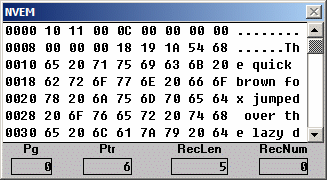
You need SPLat/PC V6.15.0 or later to support NVEM. This page details the special support for NVEM0. This is in addition to the general NVEM support in SPLat/PC.
Note that current versions of SPLat/PC (up to build 343) only support operations on Page 0 in the simulator. Operations on pages other than 0 can still be performed on real hardware.
NVEM0 receives special treatment in SPLat/PC because it can be used for pre-constructed (static) tables. Hence, SPLat/PC needs a way of specifying those tables. This is achieved through a number of "directives" or "pseudo-operations". A directive is something you write in your program that is interpreted by SPLat/PC and used to control what it does. A directive does not result in an executable instruction being loaded into the SPLat board. You are probably already familiar with the directives EQU, mEQU etc.
In your program a directive consists of an optional line label, the directive itself (the keyword) and in most cases an argument. If there is no line label the keyword must start at column 2 or later.
For NVEM0 there are several directives for creating data tables and pointers, plus one for declaring the end of your SPLatWare code and the start of the NVEM storage area.
In each of the following "Label" is an optional name on a line. If used, a subsequent reference to Label will return the NVEM0 address of the line. The directives are:
NVEM0This must be used to mark the boundary, within your program source file (.spt file), between executable code and NVEM0. Everything before this must be executable code, and everything after it must be NVEM0 directives. You may only have one NVEM0 in a program.
Label NV0Byte b1,b2, ....Creates one or more bytes of table data with the value b1, b2 etc. The Label is optional.
Label NV0fNum ffCreates 4 bytes of table data containing the floating point number ff. The Label is optional.
Label NV0Text "The quick brown fox"Inserts the quoted text into NVEM. Note that the text string may be any length, and it is stored without any length count or end sentinel. The Label is optional.
Label NV0Ptr LblCreates a 2-byte entry that contains the NVEM address corresponding to Lbl. Lbl must exist as a line label in the NVEM0 section of your program. The Label is optional.
SPLat/PC, starting with V6.15.0, includes a window to represent NVEM. It shows the NVEM registers and the data for the selected page. The data display is in hexadecimal and ASCII. The display cannot be manually edited.
Initially the NVEM display will have zero in all registers and 'FF in all data locations. The data display will be initialized with any static table data the first time the simulator executes an instruction that accesses the data. Thereafter it will be initialized whenever you reset the simulator (Run>Reset or CTRL+F7), returning it to a state like a board with a newly downloaded program.