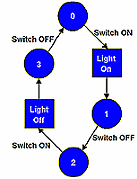
Having done the Online (FastTrack) training course (you have done it, haven't you?) where you first met SPLatty, you will be very familiar with SPLatMaps. SPLatMaps are our particular take on Finite State Machines (FSM). FSMs are a widely recognised method of designing sequential programs that can respond to external conditions in ways that vary depending on "where they are".
The very first example in the Online course was a push on - push off light switch. The SPLatMap for that function is reproduced here. You should recognise it! The circles represent times in the life of SPLatty where he is waiting for something of interest to happen. We call these states. The arrows leading out of the circles, with attendant text labels, represent external events that SPLatty is interested in at that time (in that state). The rectangles represent actions SPLatty takes when the event occurs. Finally the arrows out of the action boxes tell us what new state SPLatty goes to when he has taken the indicated action. If this is all new to you NOW is the time to go and do the Online training course.
FastTrack (non-multitasking) code for this function is (assume Switch and Light are defined as an input and an output respectively):
OnOffSwitch
State0
            GoIfInOff   Switch,State0
            On          Light
State1
            GoIfInOn    Switch,State1
State2
            GoIfInOff   Switch,State2
            Off         Light
State3
            GoIfInOn    Switch,State3
            GoTo        State0
This will look different to the code in the online course, because I've taken out the now verboten instructions WaitOn and WaitOff. Study the above code until you are totally comfortable with it.
The above program is still no good for multitasking, as it will totally tie up SPLatty watching the button. There is still something missing.
What we need is a mechanism that will allow us to do a subroutine return each time we test the switch and find it is not in the condition (on or off) we are interested in. The problem is, we can't just put in a Return instruction, because next time we call the subroutine OnOffSwitch we will start the subroutine at the top. What we need is something that allows SPLatty, each time he gets sent into this subroutine, to resume working from where he left off last time.
From dialect 12 we have such a mechanism (there has been one in SPLat from Day One, but this one is conceptually easier to cope with). The mechanism is a pair of instructions called Suspend and Resume.
What the Suspend instruction does is to make SPLatty "bookmark" where he is in the program, then do a subroutine return.
What the Resume instruction does is to make SPLatty retrieve the "bookmark" and resume program execution from that point, which is where he left off with the Suspend.
The "bookmark" is actually a program memory address that is captured and stored in RAM memory. It takes 2 bytes to store such an address, so you need to set aside 2 bytes for the purpose.
Here is the OnOffSwitch subroutine re-written with Suspend and Resume instructions. Each of those refers to memory location OnOffAddr, which must have been defined in an mEQU directive and must have had 2 bytes reserved for it.
OnOffSwitch
            Resume      OnOffAddr
OnOffInit
State0
            Suspend     OnOffAddr
            GoIfInOff   Switch,State0
            On          Light
State1
            Suspend     OnOffAddr
            GoIfInOn    Switch,State1
State2
            Suspend     OnOffAddr
            GoIfInOff   Switch,State2
            Off         Light
State3
            Suspend     OnOffAddr
            GoIfInOn    Switch,State3
            GoTo        State0
You will see that in this code a Suspend has been added inside each wait loop. At the "subroutine entry point", i.e. OnOffSwitch, the line the MainLoop does a Gosub to, we have a Resume. That will grab the "bookmarked" address and then jump to that spot in the program.
The final detail is the label OnOffInit. This is the initialization entry point. It must be called before any call is made to the "main entry point" OnOffSwitch. It serves to "prime" the bookmark ready for the first call to the main entry point, OnOffSwitch.
Another little point: OnOffInit and State0 actually both refer to the same line of executable code (remember a line label my be on a line of its own). I chose to apply two different labels because they will be used in two different contexts, it helps to make the program more readable and it aids me in being boringly consistent in how I label lines. Later on I will introduce you to the full and actual labelling scheme I use.
Special note: This tutorial and the multitasking mechanism it covers have largely been superseded by the newer MultiTrack mechanism. MultiTrack achieves everything and more, with considerably less programming effort. The only time you would use this older multitasking mechanism would be if the controller you are using is unable to handle as many tasks as you need using MultiTrack.