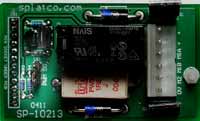
Once installed on a SPLat controller, the SPice10213 appears as several regular analog and digital I/O points. The following table shows the mappings for all the I/O on the board. Numbers in parenthesis are the numeric analog channel numbers used with fAnIn and fAnOut.
| Function | Cnctr pin | SLXXX | MMiXXX | MS12 | |
|---|---|---|---|---|---|
| Motor 1 direction | 4 | Output 8 | Output 16 | Output 12 | |
| Motor 1 speed | 8 | Output 12 | Output 20 | Output 16 | |
| (jumper = PWM) | 9 | Output 13 | Output 21 | Output 17 | |
| (jumper = DO) | 7 | Output 11 | Output 19 | Output 15 |
The above chart shows the SPice10213 function mappings for various controllers.
You will notice that SPice connector pins ("Cnctr pin") 8 and 9 have both AnOut (analog output) and "ordinary" (meaning digital) output assignment associated with them. This is because the SPice pins are configurable as to their function, and with the SPice10213 it makes sense to use PWM (variable speed) or simple digital on/off modes, depending on the application. You need to decide which mode you are going to use and then configure the SPice connector accordingly (more on this below).
Motor 1 is the reversible output. It uses one output for speed control (be it on/off or variable) and one digital output for direction.
Motor 2 is non-reversible. It requires only one output. However, you have a choice of two SPice pins, which are selected by an onboard jumper (highlighted above). The jumper has positions labelled "DO" and "PWM", which select SPice pins 7 and 9 respectively. The reason for this is that on the MMi99/200 and the SL99 pin 9 is used for the thermistor drive voltage if you are using that feature. In that case you would set the jumper to "DO" and sacrifice speed control on motor 2 in return for having the thermistor drive. In the "PWM" position you are using connector pin 9, in which case you are free to configure the pin for PWM or for on/off (digital) operation (that can be a bit confusing, that the PWM position can actually be configured for either mode).
Because the pins of the SPice connector, to which the SPice10213 is connected, can be configured for different functions (analog/digital, input/output), you need to have some code in your program that configures them to the correct settings for the SPice12013.
The following section of code should be run by your program just once, at the beginning, before your program attempts to do anything else with the SPice10213.
         ClrU
         setu         0,1         ;set spice connector pin 4 as DO (Direction 1)

;Select one of the 2 following depending on your needs:
         setu         4,4         ;set spice connector pin 8 as PWM output
         setu         4,1         ;set spice connector pin 8 as digital output


;Select one of the 3 following depending on your needs:
         setu         3,1         ;set spice connector pin 7 as digital output (jmpr="DO")
         setu         5,4         ;set spice connector pin 9 as PWM output (jmpr="PWM")
         setu         5,1         ;set spice connector pin 9 as digital output (jmpr="PWM")

         SpiceConfigU             ;Commit the configuration