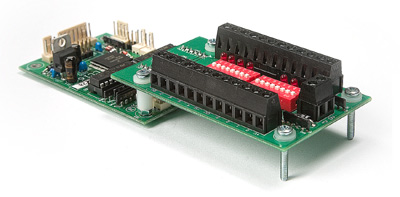
Note: Early revisions of this board are labelled CC16BB. Later revisions are CCBB.
The CCBB is a plug-on board designed to make your life easier during development of a CC16/18 controller application. It features:
When you receive the CCBB, the mounting hardware will be loose. You need to assemble it yourself. Use the picture above as a guide. The breakout board is not permanently fixed to the controller. The screws simply act as locating pins and feet. The CCBB is intended only as a temporary attachment while you develop your program. When plugging the two boards together, take care to align the connectors properly. It is perfectly normal for a small part of the pins on the controller to be visible when the two boards are connected.
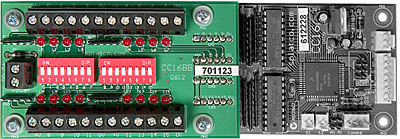
The above picture shows the CCBB from above. You can connect power for the whole assembly through the pair of screw terminals on the left. That connection has a polarity protection diode.
You can also use the regular power connector on the CC16/18 itself, if you prefer. It is not advisable to feed power in to the V+ terminals on the long edges of the breakout board, as these are not polarity protected. They are intended as a convenience for supplying power to external devices.
While you are experimenting with a program you can use the DIP switches and indicator LEDs to stand in for real external I/O devices. Just remember that each I/O point is actually an output wired in parallel with an input. To use it as an input the corresponding output must be OFF. If the output is turned ON, the LED will turn on and the corresponding input will register as ON. In all cases ON means there is a connection from the pin to 0V (ground, circuit common).
External input and output devices are connected using the same principles as connecting directly to the controller board. The only difference is that the plug-in pins of the CC16/18 have been extended to screw terminals.
When you do connect external devices, make sure that the DIP switches are turned OFF.
The best way to become comfortable with the breakout board is to hook everything together, connect to SPLat/PC and experiment with the I/O window in SPLat/PC.
The CCBB does not support the CC18 analog inputs.