Together, recent firmware and Dash enable you to access memory beyond the traditional 250 bytes that SPLat controllers have provided for the past 3 decades. For most products, that extends to 8192 bytes.
Accessing Extended Memory
To access the extended memory, you’ll first need a “recent” version of the SPLat firmware. So what does “recent” mean here?
I thought you’d never ask.
Every item of 32-bit firmware built from 19 September 2023 implements 16-bit addressing. 8-bit firmware does not support 16-bit memory.
How do you tell the build date? There are a number of ways:
- Check the serial number sticker. The first two digits are the year the board went through production. If those digits are lower than 23, or higher than 70, the board was built before 2023. The odds are that boards built in 2023 won’t have the extended RAM capability either. For that matter, if the firmware hasn’t been changed for a while, even boards built later than that may not have the extended RAM.
- Issue an “SPxPoll4 5,!CPU” command. This retrieves the build date (as a value in W in the format YYMMDD), if the board was built after that command was issued. If the board resets instead of returning a value, you almost certainly don’t have extended RAM available.
- Ask us at SPLat.
Once you have the right firmware, you’ll need Dash, of course. SPLat/PC does not support 16-bit programming.
Using 16-Bit RAM
So how do you access this extended memory?
First things first: In Dash, go to the SPLat tab and change the Memory Limit value from 255 to 8191.
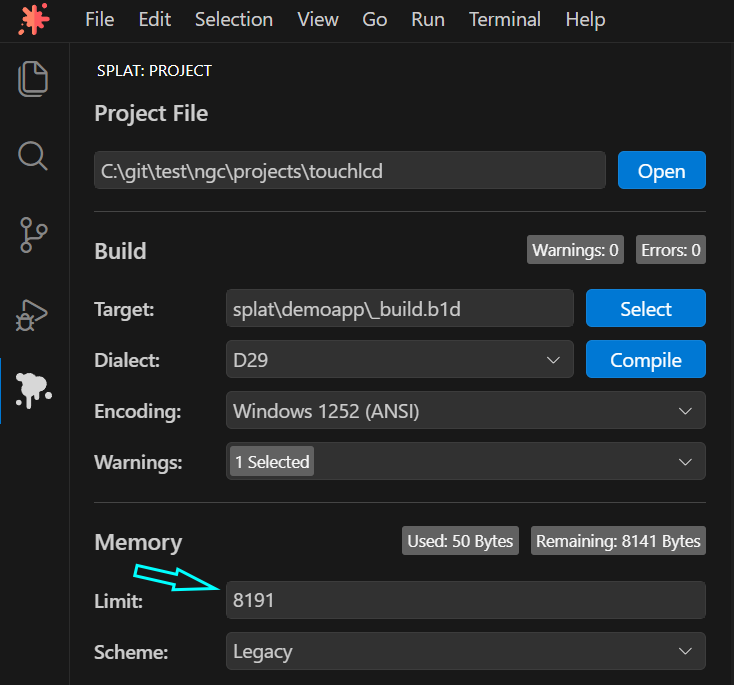
If you’re using automatic memory allocation (defSEM, defBYTE, etc), Dash will automatically allocate the memory wherever it fits, all the way up to the 8K limit.
If you’re using manual allocation (mEQU, etc), you can simply allocate the memory anywhere you want within that 8192-byte area.
Modbus was written from the start to access 16-bit RAM addresses, so that has not changed. What has changed with Modbus is the memory you can access.
- Addresses 40001 to 41000 can access RAM up to address 999 in Word (16-bit) mode with Byte addressing.
- Addresses 41001 to 42000 can access RAM up to address 999 in Byte (8-bit) mode with Byte addressing.
- Addresses 43001 to 45000 can access RAM up to address 3999 in Word (16-bit) mode with Word addressing.
Caveats
So what could possibly go wrong?
One key thing is that NVEM0 tables can end up misaligned. If you’re using an NVEM0 table and it’s accessing RAM addresses, a value that you expect to be 8-bit can quietly become 16-bit, allocating two bytes of table instead of one. This can result in all sorts of issues, such as the code attempting to access memory that doesn’t exist or that is not what you wanted, or (arguably worse) the code jumping to some location with an incorrect address.
To add to the fun, Xwire tables are especially subject to this issue. All memory accessed by Xwire must be in the lower 250 bytes.
How do you tell this has happened? Look in the listing file (.LST). Here’s a section of our Production list file for the HMI430:
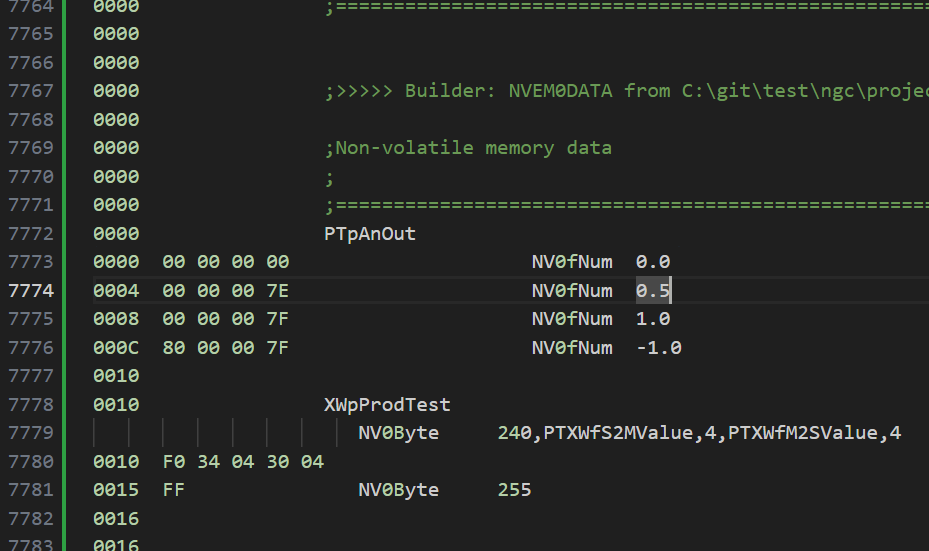
Those items that say “PTXWf…” are RAM addresses. Here, they’re one-byte addresses, so the Xwire table only has 5 bytes, each corresponding to the values in the “NV0Byte” declaration. If it suddenly had an extra byte, you would know there’s an issue.
Similarly, if you have an NVEM0 table that uses RAM addresses, it’s possible to debug some issues by casting your eyes over the NVEM0 part of the .LST file to look for values that don’t match the pattern: Specifically, extra bytes where you don’t expect them.
Don’t ask me how I know this…