VB.NET – Form design
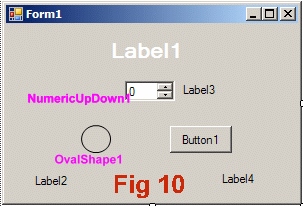
Figure 10 shows the form in the VB.NET form designer. Each of the items has the name given by VB.NET when I placed it. (I added the pink labels to the screen shot manually)
- Label1 represents the heater. You can make it large and change its font to white and large, like I have, but that’s not essential
- Label2 shows the state number
- Label3 contains “°C”
- Label4 shows the timer
- NumericUpDown1 sets the tank temperature
- OvalShape1 is the alarm indicator
- Button1 is the alarm reset button
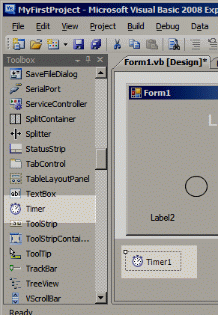
In addition to the above, you also need to generate a Timer control. Select Timer from the VB Toolbox, and click onto the form background. Timer1 should appear in a grey band at the bottom of the form designer.
Program your own Finite State Machine using a SPLat Controller for only $29.00.
The EC1 “EasyOne”, a 32-bit fully featured SPLat Controller with USB and true multi-tasking is a easy way to learn and a cheap way to build your project.
Can you work out what this state machine is for? The answer is here: